Comms Process Flow: Triggers
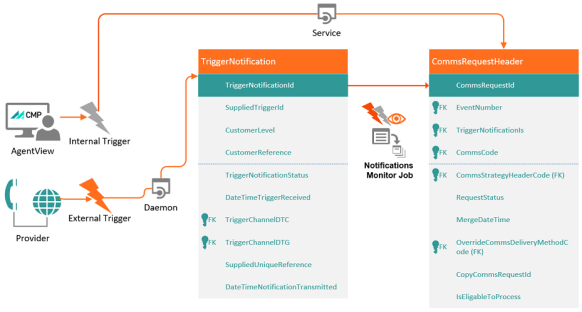
The Communications (Comms) process starts when a communication request is triggered. When a trigger is invoked, CMP Converged Monetisation Platform. The MDS Global product that supports customer care and billing for digital service providers. creates an entry in the core table in Comms, the CommsRequestHeader table. A trigger can be:
- Internal - for example a CMP workflow event, raised either manually or automatically
- External - a request from an external system.
The following sections describe the process for internal and external triggers in more detail.
Process Flow for External Comms Triggers
Comms requests can be created in CMP on receipt of notifications from external systems, for example an Online Charging System (OCS) can alert a customer In the context of the Cloud Monetisation Platform, an individual or organisation who has signed an agreement to take goods and services from a service provider. A customer receives a bill associated with one or more subscriptions, and can be a single end user or a large company with many subscriptions assigned to one agreement. when they are close to consuming all their data allowance. The notifications are formatted according to a JSON schema A specification for JSON based format for defining the structure of JSON data., commsExternalTrigger.schema. Communications from external systems are handled by the Load Comms from Generic Format daemon A computer program that runs as a background process, rather than being under the control of an interactive user. (also known the External Trigger daemon) and the Notification Monitor batch job.
For more information on daemons and batch jobs see Communications Jobs and Daemons and the CMP Batch Jobs and JSON JavaScript Object Notation. JSON is a lightweight format for storing and transporting data, often used when data is sent from a server to a web page. Schemas Guide.
The Load Comms from Generic Format daemon is subscribed to the inbound message queue and is notified when a message arrived. The URL for the message queue is set by the daemon properties:
| Property | Description | Example |
|---|---|---|
| comms.external.monitor.load.transfer.properties.brokerUrl | The URL of the ActiveMQ instance onto which inbound external comm triggers are placed e.g. module-properties-help.camel.ACTIVEMQ.brokerurl. | tcp://127.0.0.1:61616 |
| comms.external.monitor.load.transfer.properties.destinationName | The name of the queue onto which inbound external comm triggers are placed. | inboundCommsExternal |
For more information see Load Comms From Generic Format in Communications Jobs and Daemons.
When the daemon receives a notification, a record is written into the TriggerNotification table.
Once the triggerNotification table is updated, the Notification Monitor job can either be triggered automatically or a user A person with the capability to log in to the CMP GUI software, such as a customer service advisor or agent. can run the job manually.
See the CMP Operations Overview and the Administration Console An operations web console that allows batch jobs to be scheduled, run manually and monitored. The console also provides for viewing and modification of business and user applicable system configuration. Help for more information on the job.
The job cross-references the record (SuppliedTriggerId value) from the TriggerNotification table to the TriggerID value in the triggerAction table to see what comms need to be sent. The job can either send a comms request, raise a workflow event, or do both. The request depends on the configuration of the comms code.
For more information on comms codes, see Communications Templates (Comms Codes).
If CommsCode is populated in the triggerAction table, the job creates an entry in the CommsRequestHeader table.
If a workflow event is configured against the TriggerID in the TriggerAction table, the workflow will be raised against the supplied customer reference (Account In the Cloud Monetisation Platform, a billing entity that can be used to manage payments on one or more subscriptions or payments for services. An account can hold details such as payments or invoices. or Subscription A billing entity that incurs a charge. Examples include a network attached device whose usage you want to measure and charge for, or a monthly software subscription) supplied in the original JSON file, using the Event Type and Event Code from the TriggerAction entry.
Once the request has been completed, the job updates the TriggerNotificationStatus in the TriggerNotification table to P (Processed).
If the SuppliedTriggerID value does not match any TriggerID between the TriggerNotification and TriggerAction tables, an error is raised. The job creates an error in the TriggerNotificationError table.
Finally, the job updates the TriggerNotificationStatus in the TriggerNotification table to E (Error).
Process Flow for Internal Comms Triggers
In CMP, much communication is currently driven by workflows:
- Comms can be automatically raised when a workflow is created or resolved, depending on the configuration of the workflow event.
- A one-off comms can be manually added to a workflow event via AgentView The graphical user interface of the CMP that is typically used by Customer Service Agents to access CMP customer and billing data. In versions prior to CMP 8.0, this was called the CMP GUI..
Process Flow for Comms Raised when A Workflow Event is Created or Resolved
When a workflow event that is configured to raise a comm is created, the Workflow Monitor job checks the following tables:
For each entry that has a comms code populated for the Workflows Event Type and Event Code in the DiaryEventCodeComms table, the job creates an entry in the CommsRequestHeader table. The comms request is created when the workflow event is created regardless of whether the comms is to be sent on creation or resolution. However the status of the comms request is different.
Process Flow when a Comm is Manually Added via AgentView
A user can add a one-off comms to a workflow event via AgentView. To do this, in the lower panel of the Event Summary screen, the user right-clicks in the Comms pane and clicks Add. This opens Add Comms pop-up.
Click the thumbnail to view a larger image of the AgentView Event Summary screen and Add Comms pop-up.
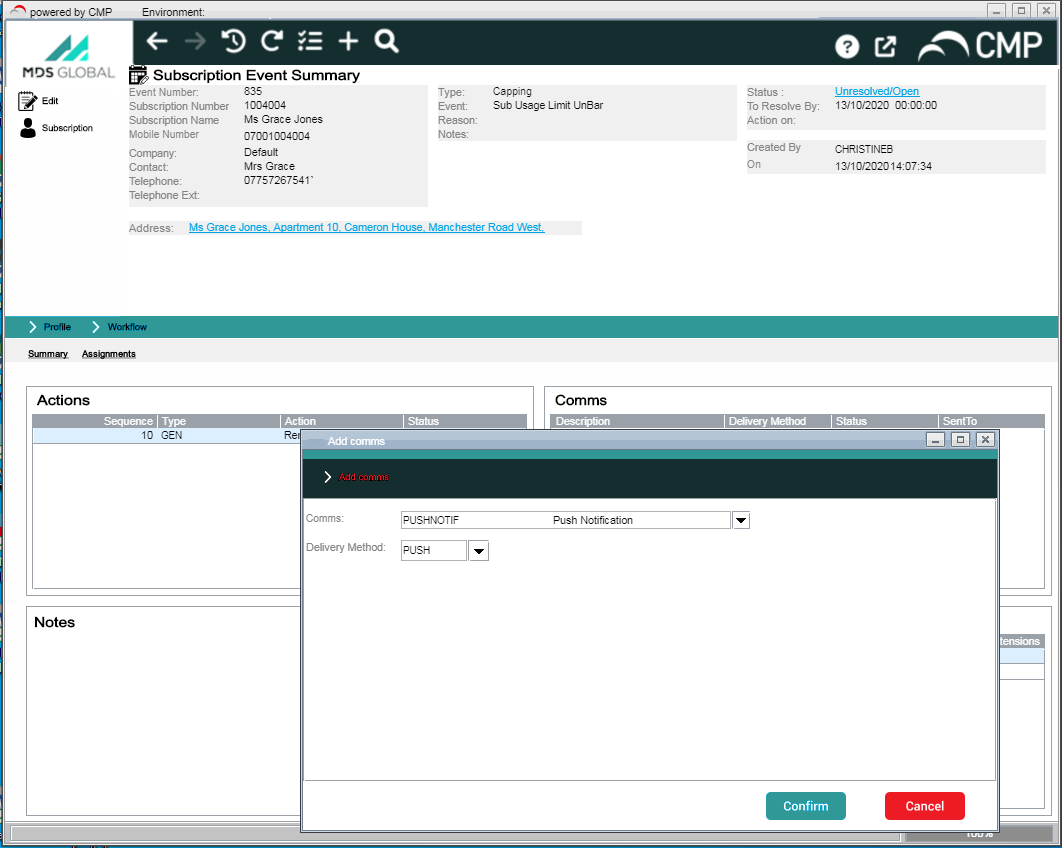
In the Add Comms pop-up, the user selects a comms from the Comms drop-down. The drop-down is populated with a list of comms taken from the CommsCode table that meet the following criteria - the comms is:
- Available and selectable.
- Applicable to the hierarchy at which the workflow event was raised.
- At a security level greater than or equal to that of the user.
Once the user selects a comms, CMP identifies the list of delivery methods from the CommsCodeCommsDeliveryMethodCode table and populates the Delivery Method drop-down.
If the user selects EMAIL as a delivery method, CMP checks whether an email address exists at the level where the comms is being raised. If no email address exists, an error message is displayed to the user informing them that it is missing and it needs to be added.
Once the comms is created, CMP creates a record in the CommsRequestHeader table.
*Because the user is manually adding the comms at the customer’s request, the choice of comms and delivery method is assumed to be deliberate. So when the Comms Monitor job comes to work out the comms and delivery method it can ignore Opt Out logic and Comms Preferences, although time exclusions are taken into consideration.